
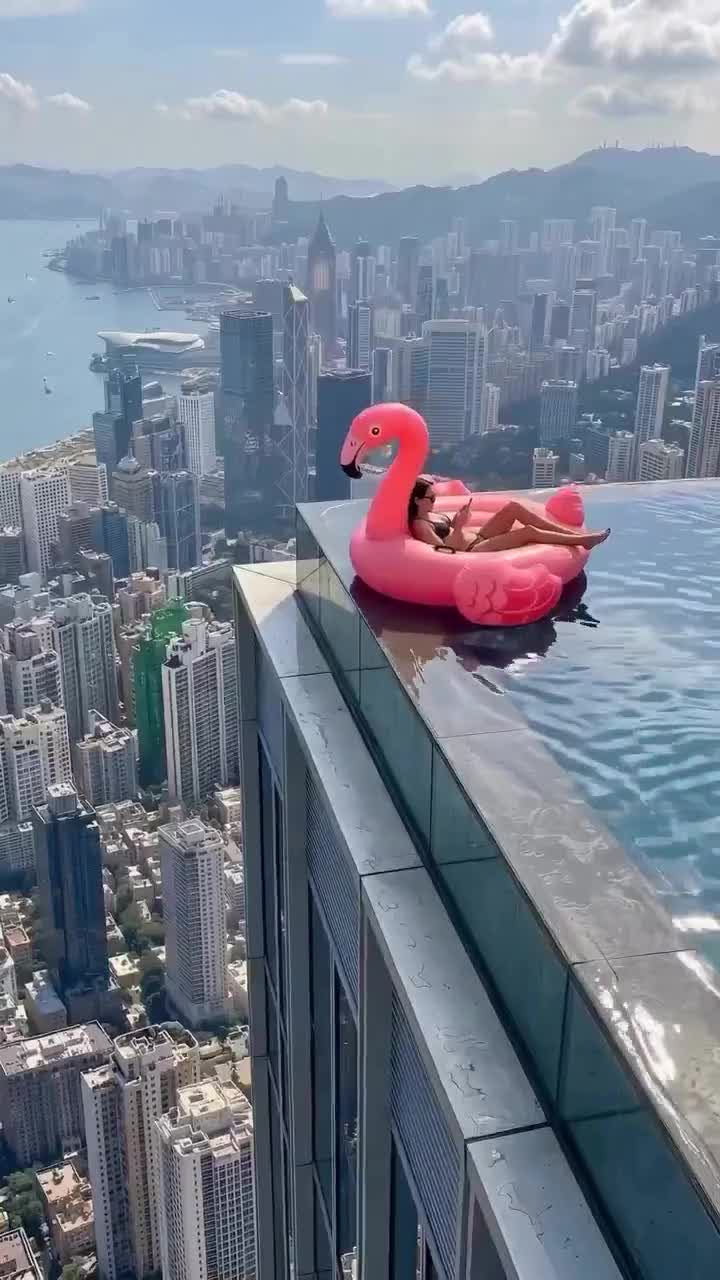
Start with the whole take
Watch once at normal speed before pausing. Can you tell where the rider is heading, why the hand appears, and what changes after it touches the float? The small story should remain readable without an explanation pasted across the screen.
This page focuses on the rescue-and-drift scene used for our generator: the float stays in the pool after the intervention. Other videos associated with the trend may use a different ending. The original video guide separates source links from generated interpretations, so you can check which version you have in mind.
Pay particular attention to the middle. The opening may establish a convincing pool and skyline, while the contact introduces a broken movement or a sudden change of person. Let the last moment play too. A pleasing start does not answer whether the scene finishes coherently.
Six details to follow in Flamingo Float AI examples
1. A face that belongs to the same person
Follow the rider from the opening through the reaction. Look at the outline of the face, the hair, and the relationship between the eyes, nose, and mouth. A change of expression is expected. A person who becomes noticeably different during a head turn needs closer inspection.
Compare at a sensible viewing size. A distant face will contain less visible detail than a close portrait. Enlarging a tiny frame cannot reveal information that was never there. Judge recognizability across the movement, then use a paused frame to understand any distracting change.
2. A float that keeps its shape on the water
The flamingo provides a useful reference throughout the shot. Follow its neck, beak, inner ring, and the part supporting the rider. They can bob and rotate, but their relationships should remain understandable. Watch for a neck that changes sides or an opening that closes around a leg.
Check the waterline at the same time. The float should appear supported by the surface as it moves. If the rim repeatedly slips under a flat sheet of water while the rider stays dry and motionless, the scene may feel inconsistent even when the pink shape looks attractive.
3. A pool edge you can keep track of
Choose a fixed feature near the edge and follow it. This could be a corner, a wall seam, or the meeting point between the water and the skyline. You should be able to tell whether the float is approaching that feature or moving away.
A camera move can change the composition, so a shifting background alone is not a problem. The question is whether the pool still makes spatial sense. If the edge jumps to another side during contact, the hand's intervention becomes difficult to read. The viewer has to rebuild the scene halfway through the joke.
4. Contact that explains the change of direction
Watch the short interval just before the hand reaches the float. Where is the hand coming from, and what does it touch? Follow that point into the next movement. The float's change of direction should feel connected to the intervention.
A pause can help you inspect a hand that briefly merges with the rim, passes through it, or appears somewhere new. Return to normal playback afterward. Decide whether the issue interrupts the action in motion, and write down the moment. A useful note says “the hand passes through the near rim”; it gives you something specific to evaluate later.
5. A reaction that arrives at the right moment
The rider's attention creates much of the humor. A relaxed person looking at a phone has somewhere to turn their attention when the hand intervenes. Follow the gaze, head movement, and expression together. The response should make sense in relation to what just happened.
A huge reaction is not required. A small glance or change of posture can carry the moment. Watch for the phone changing hands without a visible movement, or a smile appearing before the event it seems to acknowledge. These details can distract from an otherwise clear sequence.
6. Enough ending to see the result
Keep watching after contact. The float needs room to move back into the pool, and the rider's reaction needs a moment to settle. An abrupt cut can hide the consequence that makes the intervention understandable.
Look at the direction and pace of the final drift. Does it continue from the push, or suddenly accelerate toward a different destination? A final shot can be quiet and still feel complete. When choosing where to trim, preserve the point at which a viewer can comfortably tell what happened. You can tighten spare time afterward in the editing guide.
Read the input and output together
An input portrait helps explain what a generated result was asked to preserve. Compare it with both an early frame and a later reaction. This is more informative than comparing the portrait with a single carefully chosen cover.
Separate likeness from presentation. A new camera angle, pool lighting, or smaller face can change the impression without changing the person's identity. Look for stable characteristics before judging every difference as an error. Conversely, a flattering output may still resemble someone else.
Check what the input actually shows. If part of the face is hidden or the photo is distant, there is less visible information to compare. The photo guide helps you choose a clearer starting image. Use a photo of yourself or another adult who has agreed to its use, and obtain separate permission before displaying that portrait publicly beside a result.
Compare candidates on the same terms
When comparing two Flamingo Float AI examples, watch both at the same size and with the same sound setting. Give each a full playthrough. A loud soundtrack or a tighter crop can make one feel more energetic while obscuring a visual problem.
Write one sentence about each candidate. For example: “The face stays recognizable, but the hand loses contact before the direction changes.” Or: “The movement reads clearly, but the final crop removes the space the float moves into.” These are example notes, not claims about particular generated clips.
Decide which issue matters to your intended post. A slight background distraction may be acceptable; a lost identity or missing intervention may defeat the reason you made the video. If a completed clip needs a specific correction, use the visual repair guide. Keep the original candidate so you can compare a revision with it.
Give the scene two different viewings
Your first viewing asks whether the moment works. Your second asks what explains the impression. This order helps prevent a search for tiny flaws from overwhelming the basic question: can someone follow and enjoy the scene?
On the second pass, pause near contact and near the ending. Check the surrounding frames as well as the one that caught your eye. A single still can make ordinary motion look strange, while a sequence can reveal a repeated inconsistency.
If audio is present, listen separately for timing. Does a spoken response line up with the rider's visible reaction? Music and dialogue can change the mood, but they cannot establish physical contact that never appears. The sound guide covers how to identify a particular post's audio and plan your own version.
Choose the clip you can explain clearly
You do not need a numerical score for every ripple. Choose a result whose person remains recognizable, whose intervention makes sense, and whose ending completes the scene. Those observations give you a practical reason to keep a take or make a targeted revision.
When you are ready, create your own Flamingo Float scene with one authorized adult portrait. Review the scene preview and the displayed cost, then inspect your finished clip from beginning to end. A good choice becomes much easier when you know what you are watching for.